Getting Started: PyProcar’s bandsplot Function
This tutorial provides a comprehensive introduction to plotting band structures using PyProcar’s bandsplot function. You’ll learn about all the main arguments, visualization modes, caching options, and plotting configurations.
What You’ll Learn
Core ``bandsplot`` arguments and their purposes
Different visualization modes for band structure analysis
Caching functionality to speed up repeated plotting
Plotting configurations for customizing appearance
Best practices for different analysis scenarios
Prerequisites
Basic understanding of electronic band structures
PyProcar installed in your environment
VASP calculation data (we’ll use SrVO3 example data)
Overview of bandsplot Function
The bandsplot function is PyProcar’s main tool for band structure visualization. Its basic syntax is:
pyprocar.bandsplot(
    code='vasp',           # DFT code used
    dirname='.',           # Directory with calculation files
    mode='plain',          # Visualization mode
    fermi=None,           # Fermi energy
    # ... many other options
)
1. Setup and Data Loading
Let’s start by importing PyProcar and loading example data. We’ll use SrVO3 band structure data from a VASP calculation to demonstrate all the features.
[1]:
# Import required libraries
from pathlib import Path
import pyprocar

CURRENT_DIR = Path(".").resolve()
REL_PATH = "data/examples/bands/non-spin-polarized"
pyprocar.download_from_hf(relpath=REL_PATH, output_path=CURRENT_DIR)
DATA_DIR = CURRENT_DIR / REL_PATH
print(f"Data downloaded to: {DATA_DIR}")
c:\Users\lllang\miniconda3\envs\pyprocar\lib\site-packages\tqdm\auto.py:21: TqdmWarning: IProgress not found. Please update jupyter and ipywidgets. See https://ipywidgets.readthedocs.io/en/stable/user_install.html
  from .autonotebook import tqdm as notebook_tqdm
Uncompressing examples subdirectories...
Uncompressing examples\00-band_structure\non-spin-polarized.zip...
Data downloaded to: C:\Users\lllang\Desktop\notebooks\Notebook\01 - Projects\Pyprocar\pyprocar\examples\00-band_structure\data\examples\00-band_structure\non-spin-polarized
2. Core Arguments of bandsplot
Before exploring different modes, let’s understand the essential arguments of the bandsplot function:
Essential Arguments
Argument |
Type |
Description |
Example |
|---|---|---|---|
|
str |
DFT software used |
|
|
str |
Path to calculation files |
|
|
str |
Visualization mode |
|
|
float |
Fermi energy (eV) |
|
Optional Arguments
Argument |
Type |
Description |
Default |
|---|---|---|---|
|
list |
Atom indices for projection |
|
|
list |
Orbital indices for projection |
|
|
list |
Spin channels |
|
|
str |
Save plot filename |
|
|
str |
Plot title |
|
3. Basic Usage - Plain Mode
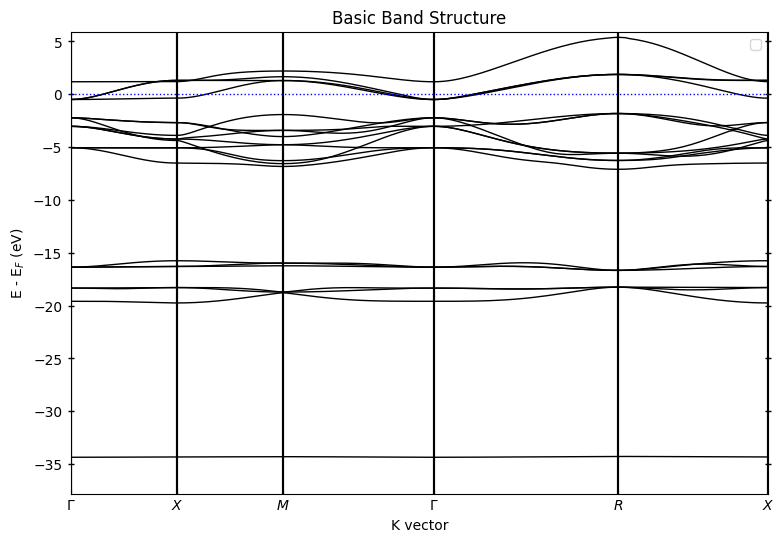
The plain mode is the simplest way to visualize band structures. It shows clean band lines without projections.
[2]:
# Basic bandsplot usage - showing essential arguments
pyprocar.bandsplot(
    code="vasp",           # Required: DFT software used
    dirname=DATA_DIR,      # Required: Directory with calculation files
    mode="plain",          # Visualization mode
    fermi=5.3017,        # Fermi energy in eV (shifts energy reference)
    title="Basic Band Structure"  # Optional: add a title
)

print("✅ Basic plot created with essential arguments only")
If you want more detailed logs, set verbose to 2 or more
____________________________________________________________________________________________________
 ____        ____
|  _ \ _   _|  _ \ _ __ ___   ___ __ _ _ __
| |_) | | | | |_) | '__/ _ \ / __/ _` | '__|
|  __/| |_| |  __/| | | (_) | (_| (_| | |
|_|    \__, |_|   |_|  \___/ \___\__,_|_|
       |___/
A Python library for electronic structure pre/post-processing.

Version 6.4.6 created on Mar 6th, 2025

Please cite:
- Uthpala Herath, Pedram Tavadze, Xu He, Eric Bousquet, Sobhit Singh, Francisco Muñoz and Aldo Romero.,
  PyProcar: A Python library for electronic structure pre/post-processing.,
  Computer Physics Communications 251, 107080 (2020).

- L. Lang, P. Tavadze, A. Tellez, E. Bousquet, H. Xu, F. Muñoz, N. Vasquez, U. Herath, and A. H. Romero,
  Expanding PyProcar for new features, maintainability, and reliability.,
  Computer Physics Communications 297, 109063 (2024).

Developers:
- Francisco Muñoz
- Aldo Romero
- Sobhit Singh
- Uthpala Herath
- Pedram Tavadze
- Eric Bousquet
- Xu He
- Reese Boucher
- Logan Lang
- Freddy Farah

____________________________________________________________________________________________________

            There are additional plot options that are defined in the configuration file.
            You can change these configurations by passing the keyword argument to the function.
            To print a list of all plot options set `print_plot_opts=True`

            Here is a list modes : plain , parametric , scatter , atomic , overlay , overlay_species , overlay_orbitals

____________________________________________________________________________________________________
Plotting bands in plain mode
✅ Basic plot created with essential arguments only
4. Visualization Modes Overview
PyProcar offers several visualization modes for different analysis needs:
Mode |
Purpose |
Key Arguments |
Use Case |
|---|---|---|---|
|
Basic band plot |
None extra |
Publication plots, general overview |
|
Projected bands |
|
Analyzing specific contributions |
|
Point-based plot |
|
Discrete contributions |
|
Custom overlays |
|
Comparing multiple projections |
|
Compare elements |
|
Multi-element systems |
|
Compare orbitals |
|
Orbital analysis |
5. Scatter/Parametric Mode - Projected Band Structures
Parametric mode shows atomic/orbital contributions through band thickness or color intensity.
Orbital Indexing Reference
s: 0
p: 1, 2, 3 (px, py, pz)
d: 4, 5, 6, 7, 8 (d orbitals)
f: 9, 10, 11, 12, 13, 14, 15 (f orbitals)
[20]:
# Parametric mode requires projection arguments
pyprocar.bandsplot(
    code="vasp",
    dirname=DATA_DIR,
    mode="parametric",
    fermi=5.3017,
    atoms=[2,3,4],                # Project onto all the Oxygen atoms
    orbitals=[1,2,3], # p orbitals (indices 1-3)
    title="SrVO$_3$ - O p-orbital contributions",
    quiet_welcome=True
)


print("📊 Parametric mode: Band thickness/color shows d-orbital contribution strength")


pyprocar.bandsplot(
    code="vasp",
    dirname=DATA_DIR,
    mode="scatter",
    fermi=5.3017,
    atoms=[1],                # Project onto all the Oxygen atoms
    orbitals=[4,5,6,7,8], # p orbitals (indices 1-3)
    title="SrVO$_3$ - V d-orbital contributions",
    quiet_welcome=True
)
If you want more detailed logs, set verbose to 2 or more
____________________________________________________________________________________________________
____________________________________________________________________________________________________
____________________________________________________________________________________________________
Plotting bands in parametric mode

📊 Parametric mode: Band thickness/color shows d-orbital contribution strength
If you want more detailed logs, set verbose to 2 or more
____________________________________________________________________________________________________
____________________________________________________________________________________________________
____________________________________________________________________________________________________
Plotting bands in scatter mode

[20]:
(<Figure size 900x600 with 2 Axes>,
 <Axes: title={'center': 'SrVO$_3$ - V d-orbital contributions'}, xlabel='K vector', ylabel='E - E$_F$ (eV)'>)
6. The Cache Argument - Speeding Up Repeated Plots
PyProcar by default caches parsed data to speed up repeated plotting with different parameters. This cached data is stored in pkl files. This is especially useful when experimenting with different visualization options or when the system is very large.
How Caching Works
First run: PyProcar reads and parses all calculation files. The data is then stored in pkl files within the calculation directory.
Subsequent runs: PyProcar loads cached data (much faster)
Cache location: Stored in the calculation directory
[4]:
# First plot - data will be parsed and cached
print("First run:")
pyprocar.bandsplot(
    code="vasp",
    dirname=DATA_DIR,
    mode="plain",
    fermi=5.3017,
    cache=False,  # Enable caching (default is True)
    title="Cached Data - Plain Mode",
    quiet_welcome=True
)
First run:
If you want more detailed logs, set verbose to 2 or more
____________________________________________________________________________________________________
____________________________________________________________________________________________________
____________________________________________________________________________________________________
Plotting bands in plain mode

[4]:
(<Figure size 900x600 with 1 Axes>,
 <Axes: title={'center': 'Cached Data - Plain Mode'}, xlabel='K vector', ylabel='E - E$_F$ (eV)'>)
7. Overlay Modes - Comparing Multiple Contributions
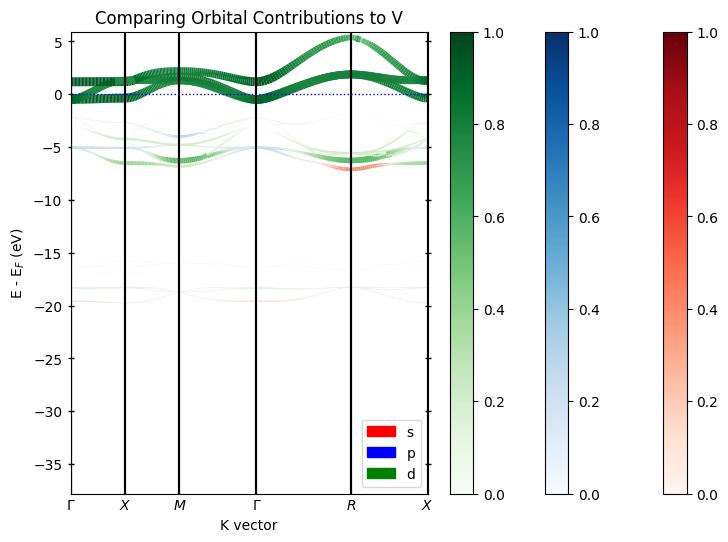
Overlay modes allow you to compare different contributions on the same plot. Each contribution gets a different color and appears in the legend.
Available Overlay Modes
``overlay_species``: Compare different atomic species
``overlay_orbitals``: Compare different orbital types
``overlay``: Custom user-defined comparisons
[5]:
# overlay_orbitals: Compare different orbital types
pyprocar.bandsplot(
    code="vasp",
    dirname=DATA_DIR,
    mode="overlay_species",
    fermi=5.3017,
    orbitals=[1,2,3],
    title="Comparing Species Contributions to p-orbitals",
    quiet_welcome=True
)

# overlay_orbitals: Compare different orbital types
pyprocar.bandsplot(
    code="vasp",
    dirname=DATA_DIR,
    mode="overlay_orbitals",
    fermi=5.3017,
    atoms=[1],  # V atom
    title="Comparing Orbital Contributions to V",
    quiet_welcome=True
)

# overlay: Custom comparisons using the items argument
items = {
    "V": [1,2,3],        # s orbital
    "O": [1,2,3],   # p orbitals
    "V": [4,5,6,7,8] # d orbitals
}

pyprocar.bandsplot(
    code="vasp",
    dirname=DATA_DIR,
    mode="overlay",
    fermi=5.3017,
    items=items,  # Custom orbital groupings
    title="Custom Orbital Comparison",
    quiet_welcome=True
)

print("🎨 Overlay modes: Each contribution gets a unique color in the legend")
If you want more detailed logs, set verbose to 2 or more
____________________________________________________________________________________________________
____________________________________________________________________________________________________
____________________________________________________________________________________________________
Plotting bands in overlay species mode

If you want more detailed logs, set verbose to 2 or more
____________________________________________________________________________________________________
____________________________________________________________________________________________________
____________________________________________________________________________________________________
Plotting bands in overlay orbitals mode
If you want more detailed logs, set verbose to 2 or more
____________________________________________________________________________________________________
____________________________________________________________________________________________________
____________________________________________________________________________________________________
Plotting bands in overlay mode

🎨 Overlay modes: Each contribution gets a unique color in the legend
8. Plotting Configurations - Customizing Appearance
PyProcar provides extensive options to customize plot appearance through various configuration arguments.
Key Configuration Arguments
Category |
Arguments |
Description |
|---|---|---|
Labels |
|
Plot titles and axis labels |
Energy |
|
Energy reference and plot range |
Colors |
|
Colormap and color limits |
Size |
|
Point and line sizes |
Output |
|
Save options |
[9]:
pyprocar.bandsplot(
    code="vasp",
    dirname=DATA_DIR,
    mode="plain",
    fermi=5.3017,
    print_plot_opts=True,
    quiet_welcome=True
)
If you want more detailed logs, set verbose to 2 or more
____________________________________________________________________________________________________
____________________________________________________________________________________________________
plot_type : PlotType.BAND_STRUCTURE
custom_settings : {}
modes : ['plain', 'parametric', 'scatter', 'atomic', 'overlay', 'overlay_species', 'overlay_orbitals']
color : black
spin_colors : ('blue', 'red')
colorbar_title : Atomic Orbital Projections
colorbar_title_size : 15
colorbar_title_padding : 20
colorbar_tick_labelsize : 10
cmap : jet
clim : (0.0, 1.0)
fermi_color : blue
fermi_linestyle : dotted
fermi_linewidth : 1
grid : False
grid_axis : both
grid_color : grey
grid_linestyle : solid
grid_linewidth : 1
grid_which : major
label : ('$\\uparrow$', '$\\downarrow$')
legend : True
linestyle : ('solid', 'dashed')
linewidth : (1.0, 1.0)
marker : ('o', 'v', '^', 'D')
markersize : (0.2, 0.2)
opacity : (1.0, 1.0)
plot_color_bar : True
savefig : None
title : None
weighted_color : True
weighted_width : False
figure_size : (9, 6)
dpi : 300
colorbar_tick_params : {}
colorbar_label_params : {}
x_label : K vector
x_label_params : {}
y_label_params : {}
title_params : {}
major_y_tick_params : {'which': 'major', 'axis': 'y', 'direction': 'inout', 'width': 1, 'length': 5, 'labelright': False, 'right': True, 'left': True}
minor_y_tick_params : {'which': 'minor', 'axis': 'y', 'direction': 'in', 'left': True, 'right': True}
major_x_tick_params : {'which': 'major', 'axis': 'x', 'direction': 'in'}
multiple_locator_y_major_value : None
multiple_locator_y_minor_value : None
____________________________________________________________________________________________________
Plotting bands in plain mode

[9]:
(<Figure size 900x600 with 1 Axes>,
 <Axes: xlabel='K vector', ylabel='E - E$_F$ (eV)'>)
[18]:
# Example 1: Customizing energy range and labels
pyprocar.bandsplot(
    code="vasp",
    dirname=DATA_DIR,
    mode="plain",
    fermi=5.3017,
    elimit=[-3, 3],  # Energy range: -3 to +3 eV around Fermi
    title="Customized Band Structure",
    minor_y_tick_params={'direction': 'inout', 'width': 1, 'length': 5, 'labelright': False, 'right': True, 'left': True},
    multiple_locator_y_minor_value=0.5,
    xlabel="Wave Vector",
    ylabel="Energy - E_F (eV)",
    quiet_welcome=True
)

# Example 2: Customizing colors and markers for parametric plot
pyprocar.bandsplot(
    code="vasp",
    dirname=DATA_DIR,
    mode="parametric",
    fermi=5.3017,
    atoms=[1],
    orbitals=[4,5,6,7,8],
    cmap="plasma",     # Different colormap
    clim=[0, 0.5],     # Color scale limits
    markersize=2,      # Smaller markers
    title="Custom Colors and Markers",
    quiet_welcome=True
)

print("🎨 Configuration options allow full customization of plot appearance")
If you want more detailed logs, set verbose to 2 or more
____________________________________________________________________________________________________
____________________________________________________________________________________________________
____________________________________________________________________________________________________
Plotting bands in plain mode

If you want more detailed logs, set verbose to 2 or more
____________________________________________________________________________________________________
____________________________________________________________________________________________________
____________________________________________________________________________________________________
Plotting bands in parametric mode

🎨 Configuration options allow full customization of plot appearance
9. Saving and Output Options
PyProcar provides several options for saving plots and controlling output quality.
Save Options
[19]:
# Saving plots with different formats and quality
pyprocar.bandsplot(
    code="vasp",
    dirname=DATA_DIR,
    mode="plain",
    fermi=5.3017,
    title="Publication Quality Band Structure",
    savefig=DATA_DIR / "band_structure.png",  # Save as PNG
    elimit=[-4, 4]
)

# Alternative: Save as vector format (better for publications)
pyprocar.bandsplot(
    code="vasp",
    dirname=DATA_DIR,
    mode="parametric",
    fermi=5.3017,
    atoms=[0],
    orbitals=[4,5,6,7,8],
    spins=[0],
    savefig=DATA_DIR / "band_structure_parametric.pdf",  # Vector format
    dpi=300,
    title="Vector Format Export"
)

print("💾 Plots saved as:")
print("   - band_structure.png (300 DPI raster)")
print("   - band_structure_parametric.pdf (vector format)")
If you want more detailed logs, set verbose to 2 or more
____________________________________________________________________________________________________
 ____        ____
|  _ \ _   _|  _ \ _ __ ___   ___ __ _ _ __
| |_) | | | | |_) | '__/ _ \ / __/ _` | '__|
|  __/| |_| |  __/| | | (_) | (_| (_| | |
|_|    \__, |_|   |_|  \___/ \___\__,_|_|
       |___/
A Python library for electronic structure pre/post-processing.

Version 6.4.6 created on Mar 6th, 2025

Please cite:
- Uthpala Herath, Pedram Tavadze, Xu He, Eric Bousquet, Sobhit Singh, Francisco Muñoz and Aldo Romero.,
  PyProcar: A Python library for electronic structure pre/post-processing.,
  Computer Physics Communications 251, 107080 (2020).

- L. Lang, P. Tavadze, A. Tellez, E. Bousquet, H. Xu, F. Muñoz, N. Vasquez, U. Herath, and A. H. Romero,
  Expanding PyProcar for new features, maintainability, and reliability.,
  Computer Physics Communications 297, 109063 (2024).

Developers:
- Francisco Muñoz
- Aldo Romero
- Sobhit Singh
- Uthpala Herath
- Pedram Tavadze
- Eric Bousquet
- Xu He
- Reese Boucher
- Logan Lang
- Freddy Farah

____________________________________________________________________________________________________

            There are additional plot options that are defined in the configuration file.
            You can change these configurations by passing the keyword argument to the function.
            To print a list of all plot options set `print_plot_opts=True`

            Here is a list modes : plain , parametric , scatter , atomic , overlay , overlay_species , overlay_orbitals

____________________________________________________________________________________________________
Plotting bands in plain mode
<Figure size 900x600 with 0 Axes>
If you want more detailed logs, set verbose to 2 or more
____________________________________________________________________________________________________
 ____        ____
|  _ \ _   _|  _ \ _ __ ___   ___ __ _ _ __
| |_) | | | | |_) | '__/ _ \ / __/ _` | '__|
|  __/| |_| |  __/| | | (_) | (_| (_| | |
|_|    \__, |_|   |_|  \___/ \___\__,_|_|
       |___/
A Python library for electronic structure pre/post-processing.

Version 6.4.6 created on Mar 6th, 2025

Please cite:
- Uthpala Herath, Pedram Tavadze, Xu He, Eric Bousquet, Sobhit Singh, Francisco Muñoz and Aldo Romero.,
  PyProcar: A Python library for electronic structure pre/post-processing.,
  Computer Physics Communications 251, 107080 (2020).

- L. Lang, P. Tavadze, A. Tellez, E. Bousquet, H. Xu, F. Muñoz, N. Vasquez, U. Herath, and A. H. Romero,
  Expanding PyProcar for new features, maintainability, and reliability.,
  Computer Physics Communications 297, 109063 (2024).

Developers:
- Francisco Muñoz
- Aldo Romero
- Sobhit Singh
- Uthpala Herath
- Pedram Tavadze
- Eric Bousquet
- Xu He
- Reese Boucher
- Logan Lang
- Freddy Farah

____________________________________________________________________________________________________

            There are additional plot options that are defined in the configuration file.
            You can change these configurations by passing the keyword argument to the function.
            To print a list of all plot options set `print_plot_opts=True`

            Here is a list modes : plain , parametric , scatter , atomic , overlay , overlay_species , overlay_orbitals

____________________________________________________________________________________________________
Plotting bands in parametric mode
<Figure size 900x600 with 0 Axes>
💾 Plots saved as:
   - band_structure.png (300 DPI raster)
   - band_structure_parametric.pdf (vector format)
Summary: Mastering bandsplot
🎉 Congratulations! You’ve learned the complete bandsplot function including:
Core Concepts Covered
Essential arguments:
code,dirname,mode,fermiVisualization modes:
plain,parametric,overlay_*Caching: Speed up repeated plotting with
cache=TrueConfigurations: Customize appearance with colors, labels, limits
Output options: Save high-quality plots for publications
💡 Key Takeaways
Concept |
Key Points |
|---|---|
Arguments |
Start with |
Modes |
Choose based on analysis goal |
Caching |
Always use |
Configuration |
Customize with |
Best Practices |
Use orbital names, meaningful titles |
🚀 Quick Reference
# Basic usage
pyprocar.bandsplot(code='vasp', dirname='.', mode='plain', fermi=E_F)

# With projections
pyprocar.bandsplot(code='vasp', dirname='.', mode='parametric',
                  fermi=E_F, atoms=[0], orbitals=[4,5,6,7,8], spins=[0])

# Custom overlays
pyprocar.bandsplot(code='vasp', dirname='.', mode='overlay',
                  fermi=E_F, items={'d-orbitals': ['d']})