Dealing with Spin in PyProcar fermi2D
This tutorial provides a comprehensive guide to handling different spin configurations when plotting 2D Fermi surfaces using PyProcar’s fermi2D function. Understanding how PyProcar handles spin is crucial for correctly interpreting and visualizing electronic structure at the Fermi level in magnetic materials.
Understanding Spin in 2D Fermi Surface Analysis
PyProcar’s fermi2D function handles spin differently depending on the type of magnetic calculation:
Spin-Polarized Case
In spin-polarized calculations (collinear magnetism), the spin-up and spin-down channels are separate entities. This means:
There are two distinct spin channels (spin-up and spin-down)
Each spin channel has its own Fermi surface topology
Each spin channel has its own corresponding orbital projections
The Fermi surfaces for different spins can be plotted with different colors or line styles
You can analyze spin-up and spin-down Fermi surfaces independently
Total electronic properties = Properties(spin-up) + Properties(spin-down)
Non-Collinear Case
In non-collinear magnetic calculations, the situation is more complex:
Spin-up and spin-down can no longer be treated in isolation
There is only 1 spin channel (the total system)
However, there are 4 spin projections corresponding to:
Total magnetization (scalar)
sx (x-component of spin)
sy (y-component of spin)
sz (z-component of spin)
These projections provide information about the local magnetic moments and their orientations
Spin texture visualization becomes crucial for understanding the magnetic character of the Fermi surface
Key fermi2D Modes for Spin Analysis
``plain``: Basic Fermi surface contours for each spin channel
``parametric``: Fermi surface with orbital/atomic projections per spin
``spin_texture``: Visualization of spin orientation vectors on the Fermi surface
``plain_bands``: Individual band contributions to the Fermi surface
This tutorial will demonstrate how to plot and analyze 2D Fermi surfaces for both cases.
1. Setup and Data Loading
[1]:
# Import required libraries
from pathlib import Path
import pyprocar

CURRENT_DIR = Path(".").resolve()
SPIN_POL_PATH = "data/examples/fermi2d/spin-polarized"
NON_COLLINEAR_PATH = "data/examples/fermi2d/non-colinear"
pyprocar.download_from_hf(relpath=SPIN_POL_PATH, output_path=CURRENT_DIR)
pyprocar.download_from_hf(relpath=NON_COLLINEAR_PATH, output_path=CURRENT_DIR)
SPIN_POL_DATA_DIR = CURRENT_DIR / SPIN_POL_PATH
NON_COLLINEAR_DATA_DIR = CURRENT_DIR / NON_COLLINEAR_PATH
print(f"Data downloaded to: {SPIN_POL_DATA_DIR}")
print(f"Data downloaded to: {NON_COLLINEAR_DATA_DIR}")
Data already exists at C:\Users\lllang\Desktop\notebooks\Notebook\01 - Projects\Pyprocar\pyprocar\examples\02-fermi2d\data\examples\fermi2d\spin-polarized
Data already exists at C:\Users\lllang\Desktop\notebooks\Notebook\01 - Projects\Pyprocar\pyprocar\examples\02-fermi2d\data\examples\fermi2d\non-colinear
Data downloaded to: C:\Users\lllang\Desktop\notebooks\Notebook\01 - Projects\Pyprocar\pyprocar\examples\02-fermi2d\data\examples\fermi2d\spin-polarized
Data downloaded to: C:\Users\lllang\Desktop\notebooks\Notebook\01 - Projects\Pyprocar\pyprocar\examples\02-fermi2d\data\examples\fermi2d\non-colinear
2. Spin-Polarized Fermi Surface Plotting
In this section, we’ll explore how to plot spin-polarized 2D Fermi surfaces using different modes. Spin-polarized calculations provide separate Fermi surface topologies for spin-up and spin-down electrons.
2.1 Plain Mode - Basic Spin-Polarized Fermi Surface
In plain mode, PyProcar plots the Fermi surface contours without any orbital projections. For spin-polarized systems, this will show both spin channels, typically with different colors or line styles to distinguish between spin-up and spin-down contributions.
[2]:
# Plot spin-polarized Fermi surface in plain mode
pyprocar.fermi2D(
    code='vasp',
    dirname=SPIN_POL_DATA_DIR,
    mode='plain',
    fermi=5.3017,
    energy=0.0,  # Energy relative to Fermi level
)
If you want more detailed logs, set verbose to 2 or more
____________________________________________________________________________________________________
 ____        ____
|  _ \ _   _|  _ \ _ __ ___   ___ __ _ _ __
| |_) | | | | |_) | '__/ _ \ / __/ _` | '__|
|  __/| |_| |  __/| | | (_) | (_| (_| | |
|_|    \__, |_|   |_|  \___/ \___\__,_|_|
       |___/
A Python library for electronic structure pre/post-processing.

Version 6.4.6 created on Mar 6th, 2025

Please cite:
- Uthpala Herath, Pedram Tavadze, Xu He, Eric Bousquet, Sobhit Singh, Francisco Muñoz and Aldo Romero.,
  PyProcar: A Python library for electronic structure pre/post-processing.,
  Computer Physics Communications 251, 107080 (2020).

- L. Lang, P. Tavadze, A. Tellez, E. Bousquet, H. Xu, F. Muñoz, N. Vasquez, U. Herath, and A. H. Romero,
  Expanding PyProcar for new features, maintainability, and reliability.,
  Computer Physics Communications 297, 109063 (2024).

Developers:
- Francisco Muñoz
- Aldo Romero
- Sobhit Singh
- Uthpala Herath
- Pedram Tavadze
- Eric Bousquet
- Xu He
- Reese Boucher
- Logan Lang
- Freddy Farah

____________________________________________________________________________________________________
### Parameters ###
dirname         : C:\Users\lllang\Desktop\notebooks\Notebook\01 - Projects\Pyprocar\pyprocar\examples\02-fermi2d\data\examples\fermi2d\spin-polarized
bands           : None
atoms           : None
orbitals        : None
spin comp.      : None
energy          : 0.0
rot. symmetry   : 1
origin (trasl.) : [0, 0, 0]
rotation        : [0, 0, 0, 1]
save figure     : None
spin_texture    : False
____________________________________________________________________________________________________

            There are additional plot options that are defined in a configuration file.
            You can change these configurations by passing the keyword argument to the function
            To print a list of plot options set print_plot_opts=True

            Here is a list modes : plain , plain_bands , parametric
____________________________________________________________________________________________________
Initial kpoints shape: (10981, 3)
Initial bands shape: (10981, 30, 2)
Initial projected shape: (10981, 30, 5, 1, 9, 2)
WARNING: Make sure the kmesh has the correct number of kz pointswith kz=0.0 +- 0.01.
Kpoints in the kz=0.0 plane: (4205, 3)
Bands in the kz=0.0 plane: (4205, 30, 2)
Projected in the kz=0.0 plane: (4205, 30, 5, 1, 9, 2)
Spins for projections: [0 1]
Atoms for projections: [0 1 2 3 4]
Orbitals for projections: [0 1 2 3 4 5 6 7 8]
Band indices near iso-surface: (bands.shape=(4205, 30)) spin-0 | bands-[16 17 18]
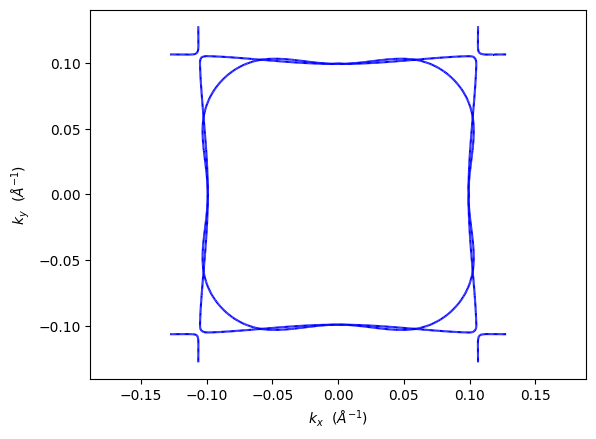
What you’ll see in spin-polarized Fermi surface:
Fermi surface contours for both spin-up and spin-down channels
kx and ky coordinates on the x and y axes
Different colors or line styles for each spin channel
Closed/open contours representing different Fermi surface topologies
Spin channels differentiated by color (typically blue for spin-up, red for spin-down)
2.2 Customizing Spin-Polarized Fermi Surface
You can customize various aspects of the spin-polarized Fermi surface plot, including colors, line styles, and line widths.
[3]:
# Plot customized spin-polarized Fermi surface
pyprocar.fermi2D(
    code='vasp',
    dirname=SPIN_POL_DATA_DIR,
    mode='plain',
    fermi=5.3017,
    energy=0.0,
    color=['purple', 'green'],  # Custom colors for each spin channel
    linewidth=2.0,  # Customize linewidth for contours
    linestyle=['solid', 'dashed'],  # Customize linestyle for each spin channel
)

print("🎨 Customized spin-polarized Fermi surface with purple spin-up and green spin-down")
If you want more detailed logs, set verbose to 2 or more
____________________________________________________________________________________________________
 ____        ____
|  _ \ _   _|  _ \ _ __ ___   ___ __ _ _ __
| |_) | | | | |_) | '__/ _ \ / __/ _` | '__|
|  __/| |_| |  __/| | | (_) | (_| (_| | |
|_|    \__, |_|   |_|  \___/ \___\__,_|_|
       |___/
A Python library for electronic structure pre/post-processing.

Version 6.4.6 created on Mar 6th, 2025

Please cite:
- Uthpala Herath, Pedram Tavadze, Xu He, Eric Bousquet, Sobhit Singh, Francisco Muñoz and Aldo Romero.,
  PyProcar: A Python library for electronic structure pre/post-processing.,
  Computer Physics Communications 251, 107080 (2020).

- L. Lang, P. Tavadze, A. Tellez, E. Bousquet, H. Xu, F. Muñoz, N. Vasquez, U. Herath, and A. H. Romero,
  Expanding PyProcar for new features, maintainability, and reliability.,
  Computer Physics Communications 297, 109063 (2024).

Developers:
- Francisco Muñoz
- Aldo Romero
- Sobhit Singh
- Uthpala Herath
- Pedram Tavadze
- Eric Bousquet
- Xu He
- Reese Boucher
- Logan Lang
- Freddy Farah

____________________________________________________________________________________________________
### Parameters ###
dirname         : C:\Users\lllang\Desktop\notebooks\Notebook\01 - Projects\Pyprocar\pyprocar\examples\02-fermi2d\data\examples\fermi2d\spin-polarized
bands           : None
atoms           : None
orbitals        : None
spin comp.      : None
energy          : 0.0
rot. symmetry   : 1
origin (trasl.) : [0, 0, 0]
rotation        : [0, 0, 0, 1]
save figure     : None
spin_texture    : False
____________________________________________________________________________________________________

            There are additional plot options that are defined in a configuration file.
            You can change these configurations by passing the keyword argument to the function
            To print a list of plot options set print_plot_opts=True

            Here is a list modes : plain , plain_bands , parametric
____________________________________________________________________________________________________
Initial kpoints shape: (10981, 3)
Initial bands shape: (10981, 30, 2)
Initial projected shape: (10981, 30, 5, 1, 9, 2)
WARNING: Make sure the kmesh has the correct number of kz pointswith kz=0.0 +- 0.01.
Kpoints in the kz=0.0 plane: (4205, 3)
Bands in the kz=0.0 plane: (4205, 30, 2)
Projected in the kz=0.0 plane: (4205, 30, 5, 1, 9, 2)
Spins for projections: [0 1]
Atoms for projections: [0 1 2 3 4]
Orbitals for projections: [0 1 2 3 4 5 6 7 8]
Band indices near iso-surface: (bands.shape=(4205, 30)) spin-0 | bands-[16 17 18]
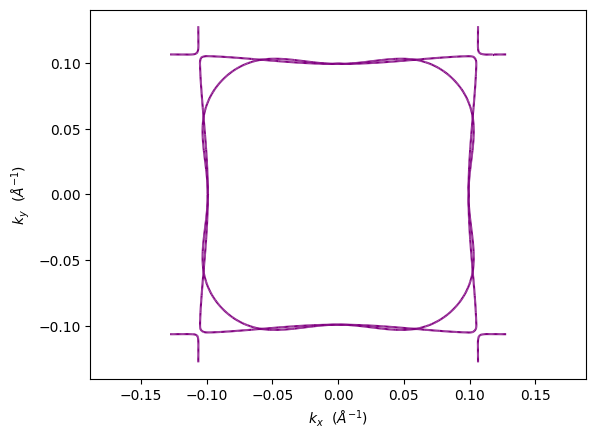
🎨 Customized spin-polarized Fermi surface with purple spin-up and green spin-down
2.3 Parametric Mode - Spin-Polarized Fermi Surface with Orbital Projections
In parametric mode, we can visualize the orbital character of the Fermi surface while maintaining the spin separation. This is particularly useful for understanding which orbitals contribute to the Fermi surface topology in each spin channel.
[4]:
# Plot spin-polarized Fermi surface with d-orbital projections
pyprocar.fermi2D(
    code='vasp',
    dirname=SPIN_POL_DATA_DIR,
    mode='parametric',
    fermi=5.3017,
    atoms=[1],  # Magnetic atom (often transition metal)
    orbitals=[4,5,6,7,8],  # d orbitals
    energy=0.0,
)

print("⚛️ Parametric Fermi surface showing d-orbital contributions to each spin channel")
If you want more detailed logs, set verbose to 2 or more
____________________________________________________________________________________________________
 ____        ____
|  _ \ _   _|  _ \ _ __ ___   ___ __ _ _ __
| |_) | | | | |_) | '__/ _ \ / __/ _` | '__|
|  __/| |_| |  __/| | | (_) | (_| (_| | |
|_|    \__, |_|   |_|  \___/ \___\__,_|_|
       |___/
A Python library for electronic structure pre/post-processing.

Version 6.4.6 created on Mar 6th, 2025

Please cite:
- Uthpala Herath, Pedram Tavadze, Xu He, Eric Bousquet, Sobhit Singh, Francisco Muñoz and Aldo Romero.,
  PyProcar: A Python library for electronic structure pre/post-processing.,
  Computer Physics Communications 251, 107080 (2020).

- L. Lang, P. Tavadze, A. Tellez, E. Bousquet, H. Xu, F. Muñoz, N. Vasquez, U. Herath, and A. H. Romero,
  Expanding PyProcar for new features, maintainability, and reliability.,
  Computer Physics Communications 297, 109063 (2024).

Developers:
- Francisco Muñoz
- Aldo Romero
- Sobhit Singh
- Uthpala Herath
- Pedram Tavadze
- Eric Bousquet
- Xu He
- Reese Boucher
- Logan Lang
- Freddy Farah

____________________________________________________________________________________________________
### Parameters ###
dirname         : C:\Users\lllang\Desktop\notebooks\Notebook\01 - Projects\Pyprocar\pyprocar\examples\02-fermi2d\data\examples\fermi2d\spin-polarized
bands           : None
atoms           : [1]
orbitals        : [4, 5, 6, 7, 8]
spin comp.      : None
energy          : 0.0
rot. symmetry   : 1
origin (trasl.) : [0, 0, 0]
rotation        : [0, 0, 0, 1]
save figure     : None
spin_texture    : False
____________________________________________________________________________________________________

            There are additional plot options that are defined in a configuration file.
            You can change these configurations by passing the keyword argument to the function
            To print a list of plot options set print_plot_opts=True

            Here is a list modes : plain , plain_bands , parametric
____________________________________________________________________________________________________
Initial kpoints shape: (10981, 3)
Initial bands shape: (10981, 30, 2)
Initial projected shape: (10981, 30, 5, 1, 9, 2)
WARNING: Make sure the kmesh has the correct number of kz pointswith kz=0.0 +- 0.01.
Kpoints in the kz=0.0 plane: (4205, 3)
Bands in the kz=0.0 plane: (4205, 30, 2)
Projected in the kz=0.0 plane: (4205, 30, 5, 1, 9, 2)
Spins for projections: [0 1]
Atoms for projections: [1]
Orbitals for projections: [4, 5, 6, 7, 8]
Band indices near iso-surface: (bands.shape=(4205, 30)) spin-0 | bands-[16 17 18]
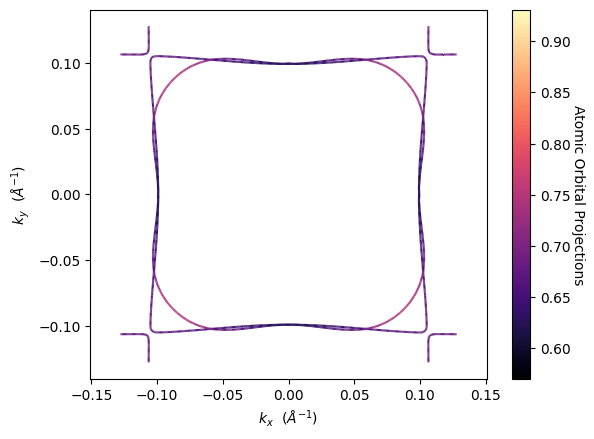
⚛️ Parametric Fermi surface showing d-orbital contributions to each spin channel
2.4 Individual Spin Channels
You can also plot specific spin channels separately to focus on one particular spin state’s Fermi surface topology.
[5]:
# Plot only spin-up Fermi surface channel
pyprocar.fermi2D(
    code='vasp',
    dirname=SPIN_POL_DATA_DIR,
    mode='parametric',
    fermi=5.3017,
    atoms=[1],
    orbitals=[4,5,6,7,8],  # d orbitals
    spins=[0],  # Only spin-up (index 0)
    energy=0.0,
    verbose=3,
)

print("⬆️ Spin-up channel only: Focus on majority spin Fermi surface")

# Plot only spin-down Fermi surface channel
pyprocar.fermi2D(
    code='vasp',
    dirname=SPIN_POL_DATA_DIR,
    mode='parametric',
    fermi=5.3017,
    atoms=[1],
    orbitals=[4,5,6,7,8],  # d orbitals
    spins=[1],  # Only spin-down (index 1)
    energy=0.0,
    verbose=3,
)

print("⬇️ Spin-down channel only: Focus on minority spin Fermi surface")
If you want more detailed logs, set verbose to 2 or more
____________________________________________________________________________________________________
 ____        ____
|  _ \ _   _|  _ \ _ __ ___   ___ __ _ _ __
| |_) | | | | |_) | '__/ _ \ / __/ _` | '__|
|  __/| |_| |  __/| | | (_) | (_| (_| | |
|_|    \__, |_|   |_|  \___/ \___\__,_|_|
       |___/
A Python library for electronic structure pre/post-processing.

Version 6.4.6 created on Mar 6th, 2025

Please cite:
- Uthpala Herath, Pedram Tavadze, Xu He, Eric Bousquet, Sobhit Singh, Francisco Muñoz and Aldo Romero.,
  PyProcar: A Python library for electronic structure pre/post-processing.,
  Computer Physics Communications 251, 107080 (2020).

- L. Lang, P. Tavadze, A. Tellez, E. Bousquet, H. Xu, F. Muñoz, N. Vasquez, U. Herath, and A. H. Romero,
  Expanding PyProcar for new features, maintainability, and reliability.,
  Computer Physics Communications 297, 109063 (2024).

Developers:
- Francisco Muñoz
- Aldo Romero
- Sobhit Singh
- Uthpala Herath
- Pedram Tavadze
- Eric Bousquet
- Xu He
- Reese Boucher
- Logan Lang
- Freddy Farah

____________________________________________________________________________________________________
### Parameters ###
dirname         : C:\Users\lllang\Desktop\notebooks\Notebook\01 - Projects\Pyprocar\pyprocar\examples\02-fermi2d\data\examples\fermi2d\spin-polarized
bands           : None
atoms           : [1]
orbitals        : [4, 5, 6, 7, 8]
spin comp.      : [0]
energy          : 0.0
rot. symmetry   : 1
origin (trasl.) : [0, 0, 0]
rotation        : [0, 0, 0, 1]
save figure     : None
spin_texture    : False
____________________________________________________________________________________________________

            There are additional plot options that are defined in a configuration file.
            You can change these configurations by passing the keyword argument to the function
            To print a list of plot options set print_plot_opts=True

            Here is a list modes : plain , plain_bands , parametric
____________________________________________________________________________________________________
[INFO] 2025-06-12 21:36:43 - pyprocar.scripts.scriptFermi2D[181][fermi2D] - Loading EBS from cached Pickle files in C:\Users\lllang\Desktop\notebooks\Notebook\01 - Projects\Pyprocar\pyprocar\examples\02-fermi2d\data\examples\fermi2d\spin-polarized
[INFO] 2025-06-12 21:36:43 - pyprocar.scripts.scriptFermi2D[191][fermi2D] - Shifting Fermi energy to zero: 5.3017
[DEBUG] 2025-06-12 21:36:43 - pyprocar.scripts.scriptFermi2D[200][fermi2D] - EBS:
 Electronic Band Structure
============================
Total number of kpoints   = 10981
Total number of bands    = 30
Total number of atoms    = 5
Total number of orbitals = 9
nkx,nky,nkz = (61,61,61)

Array Shapes:
------------------------
Kpoints shape  = (10981, 3)
Bands shape    = (10981, 30, 2)
Projected shape = (10981, 30, 5, 1, 9, 2)
Labels = ['s', 'py', 'pz', 'px', 'dxy', 'dyz', 'dz2', 'dxz', 'x2-y2']
Reciprocal Lattice =
 [[0.26 0.   0.  ]
 [0.   0.26 0.  ]
 [0.   0.   0.26]]

Additional information:
------------------------
Fermi Energy = 4.4554
Is Mesh = True
Has Phase = False

Initial kpoints shape: (10981, 3)
Initial bands shape: (10981, 30, 2)
Initial projected shape: (10981, 30, 5, 1, 9, 2)
WARNING: Make sure the kmesh has the correct number of kz pointswith kz=0.0 +- 0.01.
Kpoints in the kz=0.0 plane: (4205, 3)
Bands in the kz=0.0 plane: (4205, 30, 2)
Projected in the kz=0.0 plane: (4205, 30, 5, 1, 9, 2)
Spins for projections: [0]
Atoms for projections: [1]
Orbitals for projections: [4, 5, 6, 7, 8]
[INFO] 2025-06-12 21:36:43 - pyprocar.scripts.scriptFermi2D[254][fermi2D] - projection shape after ebs_sum: (4205, 30, 1)
[DEBUG] 2025-06-12 21:36:44 - pyprocar.core.fermisurface[86][__init__] - FermiSurface.init: ...
[INFO] 2025-06-12 21:36:44 - pyprocar.core.fermisurface[87][__init__] - Kpoints.shape : (4205, 3)
[INFO] 2025-06-12 21:36:44 - pyprocar.core.fermisurface[88][__init__] - bands.shape   : (4205, 30, 1)
[INFO] 2025-06-12 21:36:44 - pyprocar.core.fermisurface[89][__init__] - spd.shape     : (4205, 30, 1)
[DEBUG] 2025-06-12 21:36:44 - pyprocar.core.fermisurface[90][__init__] - FermiSurface.init: ...Done
[INFO] 2025-06-12 21:36:44 - pyprocar.core.fermisurface[121][find_energy] - Energy   : 0.0
Band indices near iso-surface: (bands.shape=(4205, 30)) spin-0 | bands-[16 17 18]
[DEBUG] 2025-06-12 21:36:44 - pyprocar.core.fermisurface[172][plot] - Plot: ...
[DEBUG] 2025-06-12 21:36:44 - pyprocar.core.fermisurface[180][plot] - k_x[:10], k_y[:10] values[array([-0.1279, -0.1279, -0.1279, -0.1279, -0.1279, -0.1279, -0.1279, -0.1279, -0.1279, -0.1279]), array([-0.1279, -0.1236, -0.1193, -0.1151, -0.1108, -0.1065, -0.1023, -0.098 , -0.0938, -0.0895])]
[DEBUG] 2025-06-12 21:36:44 - pyprocar.core.fermisurface[185][plot] - xlim = [-0.12785582795, 0.12785582795]  ylim = [-0.12785582795, 0.12785582795]
[DEBUG] 2025-06-12 21:36:44 - pyprocar.core.fermisurface[224][plot] - Interpolating ...
[DEBUG] 2025-06-12 21:36:45 - pyprocar.core.fermisurface[300][plot] - Plot: ...Done

⬆️ Spin-up channel only: Focus on majority spin Fermi surface
If you want more detailed logs, set verbose to 2 or more
____________________________________________________________________________________________________
 ____        ____
|  _ \ _   _|  _ \ _ __ ___   ___ __ _ _ __
| |_) | | | | |_) | '__/ _ \ / __/ _` | '__|
|  __/| |_| |  __/| | | (_) | (_| (_| | |
|_|    \__, |_|   |_|  \___/ \___\__,_|_|
       |___/
A Python library for electronic structure pre/post-processing.

Version 6.4.6 created on Mar 6th, 2025

Please cite:
- Uthpala Herath, Pedram Tavadze, Xu He, Eric Bousquet, Sobhit Singh, Francisco Muñoz and Aldo Romero.,
  PyProcar: A Python library for electronic structure pre/post-processing.,
  Computer Physics Communications 251, 107080 (2020).

- L. Lang, P. Tavadze, A. Tellez, E. Bousquet, H. Xu, F. Muñoz, N. Vasquez, U. Herath, and A. H. Romero,
  Expanding PyProcar for new features, maintainability, and reliability.,
  Computer Physics Communications 297, 109063 (2024).

Developers:
- Francisco Muñoz
- Aldo Romero
- Sobhit Singh
- Uthpala Herath
- Pedram Tavadze
- Eric Bousquet
- Xu He
- Reese Boucher
- Logan Lang
- Freddy Farah

____________________________________________________________________________________________________
### Parameters ###
dirname         : C:\Users\lllang\Desktop\notebooks\Notebook\01 - Projects\Pyprocar\pyprocar\examples\02-fermi2d\data\examples\fermi2d\spin-polarized
bands           : None
atoms           : [1]
orbitals        : [4, 5, 6, 7, 8]
spin comp.      : [1]
energy          : 0.0
rot. symmetry   : 1
origin (trasl.) : [0, 0, 0]
rotation        : [0, 0, 0, 1]
save figure     : None
spin_texture    : False
____________________________________________________________________________________________________

            There are additional plot options that are defined in a configuration file.
            You can change these configurations by passing the keyword argument to the function
            To print a list of plot options set print_plot_opts=True

            Here is a list modes : plain , plain_bands , parametric
____________________________________________________________________________________________________
[INFO] 2025-06-12 21:36:45 - pyprocar.scripts.scriptFermi2D[181][fermi2D] - Loading EBS from cached Pickle files in C:\Users\lllang\Desktop\notebooks\Notebook\01 - Projects\Pyprocar\pyprocar\examples\02-fermi2d\data\examples\fermi2d\spin-polarized
[INFO] 2025-06-12 21:36:45 - pyprocar.scripts.scriptFermi2D[191][fermi2D] - Shifting Fermi energy to zero: 5.3017
[DEBUG] 2025-06-12 21:36:45 - pyprocar.scripts.scriptFermi2D[200][fermi2D] - EBS:
 Electronic Band Structure
============================
Total number of kpoints   = 10981
Total number of bands    = 30
Total number of atoms    = 5
Total number of orbitals = 9
nkx,nky,nkz = (61,61,61)

Array Shapes:
------------------------
Kpoints shape  = (10981, 3)
Bands shape    = (10981, 30, 2)
Projected shape = (10981, 30, 5, 1, 9, 2)
Labels = ['s', 'py', 'pz', 'px', 'dxy', 'dyz', 'dz2', 'dxz', 'x2-y2']
Reciprocal Lattice =
 [[0.26 0.   0.  ]
 [0.   0.26 0.  ]
 [0.   0.   0.26]]

Additional information:
------------------------
Fermi Energy = 4.4554
Is Mesh = True
Has Phase = False

Initial kpoints shape: (10981, 3)
Initial bands shape: (10981, 30, 2)
Initial projected shape: (10981, 30, 5, 1, 9, 2)
WARNING: Make sure the kmesh has the correct number of kz pointswith kz=0.0 +- 0.01.
Kpoints in the kz=0.0 plane: (4205, 3)
Bands in the kz=0.0 plane: (4205, 30, 2)
Projected in the kz=0.0 plane: (4205, 30, 5, 1, 9, 2)
Spins for projections: [1]
Atoms for projections: [1]
Orbitals for projections: [4, 5, 6, 7, 8]
[INFO] 2025-06-12 21:36:45 - pyprocar.scripts.scriptFermi2D[254][fermi2D] - projection shape after ebs_sum: (4205, 30, 1)
[DEBUG] 2025-06-12 21:36:46 - pyprocar.core.fermisurface[86][__init__] - FermiSurface.init: ...
[INFO] 2025-06-12 21:36:46 - pyprocar.core.fermisurface[87][__init__] - Kpoints.shape : (4205, 3)
[INFO] 2025-06-12 21:36:46 - pyprocar.core.fermisurface[88][__init__] - bands.shape   : (4205, 30, 1)
[INFO] 2025-06-12 21:36:46 - pyprocar.core.fermisurface[89][__init__] - spd.shape     : (4205, 30, 1)
[DEBUG] 2025-06-12 21:36:46 - pyprocar.core.fermisurface[90][__init__] - FermiSurface.init: ...Done
[INFO] 2025-06-12 21:36:46 - pyprocar.core.fermisurface[121][find_energy] - Energy   : 0.0
ERROR: Could not find any bands crossing the energy (0.0 eV) relative to the fermi energy.
Please check the energy and the bands:

1. Try shifting the energy to find crossings of the bands and the energy.
2. Check the density of states to see where the bands are in terms of energy.
3. Check the bands to see if they are crossing the energy.
---------------------------------------------------------------------------
RuntimeError                              Traceback (most recent call last)
Cell In[5], line 17
     14 print("⬆️ Spin-up channel only: Focus on majority spin Fermi surface")
     16 # Plot only spin-down Fermi surface channel
---> 17 pyprocar.fermi2D(
     18     code='vasp',
     19     dirname=SPIN_POL_DATA_DIR,
     20     mode='parametric',
     21     fermi=5.3017,
     22     atoms=[1],
     23     orbitals=[4,5,6,7,8],  # d orbitals
     24     spins=[1],  # Only spin-down (index 1)
     25     energy=0.0,
     26     verbose=3,
     27 )
     29 print("⬇️ Spin-down channel only: Focus on minority spin Fermi surface")

File ~\Desktop\notebooks\Notebook\01 - Projects\Pyprocar\pyprocar\pyprocar\scripts\scriptFermi2D.py:309, in fermi2D(code, dirname, mode, fermi, fermi_shift, band_indices, band_colors, spins, atoms, orbitals, energy, k_z_plane, k_z_plane_tol, rot_symm, translate, rotation, spin_texture, exportplt, savefig, print_plot_opts, use_cache, verbose, **kwargs)
    299 symm.rot_symmetry_z(rot_symm)
    301 fs = FermiSurface(
    302     symm.kpoints,
    303     symm.bands,
   (...)
    307     **kwargs,
    308 )
--> 309 fs.find_energy(energy)
    311 if not spin_texture:
    312     fs.plot(mode=mode, interpolation=300)

File ~\Desktop\notebooks\Notebook\01 - Projects\Pyprocar\pyprocar\pyprocar\core\fermisurface.py:147, in FermiSurface.find_energy(self, energy)
    139 if not bands_to_plot:
    140     user_logger.error(
    141         f"Could not find any bands crossing the energy ({energy} eV) relative to the fermi energy.\n"
    142         "Please check the energy and the bands:\n\n"
   (...)
    145         "3. Check the bands to see if they are crossing the energy."
    146     )
--> 147     raise RuntimeError("No bands to plot")
    148 return None

RuntimeError: No bands to plot
3. Non-Collinear Fermi Surface Plotting
In non-collinear magnetic systems, the spin quantization axis is not fixed, and spin-up and spin-down states are mixed. PyProcar handles this by providing spin projections (total, sx, sy, sz) that help understand the local magnetic character of the Fermi surface, and most importantly, spin texture visualization becomes available.
3.1 Plain Mode - Non-Collinear Fermi Surface
First, let’s plot the basic Fermi surface without any spin projections to see the overall electronic structure at the Fermi level:
[6]:
# Plot non-collinear Fermi surface in plain mode
pyprocar.fermi2D(
    code='vasp',
    dirname=NON_COLLINEAR_DATA_DIR,
    mode='plain',
    fermi=5.3017,
    energy=0.0,
)

print("🧲 Non-collinear Fermi surface: Single channel with mixed spin states")
If you want more detailed logs, set verbose to 2 or more
____________________________________________________________________________________________________
 ____        ____
|  _ \ _   _|  _ \ _ __ ___   ___ __ _ _ __
| |_) | | | | |_) | '__/ _ \ / __/ _` | '__|
|  __/| |_| |  __/| | | (_) | (_| (_| | |
|_|    \__, |_|   |_|  \___/ \___\__,_|_|
       |___/
A Python library for electronic structure pre/post-processing.

Version 6.4.6 created on Mar 6th, 2025

Please cite:
- Uthpala Herath, Pedram Tavadze, Xu He, Eric Bousquet, Sobhit Singh, Francisco Muñoz and Aldo Romero.,
  PyProcar: A Python library for electronic structure pre/post-processing.,
  Computer Physics Communications 251, 107080 (2020).

- L. Lang, P. Tavadze, A. Tellez, E. Bousquet, H. Xu, F. Muñoz, N. Vasquez, U. Herath, and A. H. Romero,
  Expanding PyProcar for new features, maintainability, and reliability.,
  Computer Physics Communications 297, 109063 (2024).

Developers:
- Francisco Muñoz
- Aldo Romero
- Sobhit Singh
- Uthpala Herath
- Pedram Tavadze
- Eric Bousquet
- Xu He
- Reese Boucher
- Logan Lang
- Freddy Farah

____________________________________________________________________________________________________
### Parameters ###
dirname         : C:\Users\lllang\Desktop\notebooks\Notebook\01 - Projects\Pyprocar\pyprocar\examples\02-fermi2d\data\examples\fermi2d\non-colinear
bands           : None
atoms           : None
orbitals        : None
spin comp.      : None
energy          : 0.0
rot. symmetry   : 1
origin (trasl.) : [0, 0, 0]
rotation        : [0, 0, 0, 1]
save figure     : None
spin_texture    : False
____________________________________________________________________________________________________

            There are additional plot options that are defined in a configuration file.
            You can change these configurations by passing the keyword argument to the function
            To print a list of plot options set print_plot_opts=True

            Here is a list modes : plain , plain_bands , parametric
____________________________________________________________________________________________________
Initial kpoints shape: (10981, 3)
Initial bands shape: (10981, 50, 1)
Initial projected shape: (10981, 50, 5, 1, 9, 4)
WARNING: Make sure the kmesh has the correct number of kz pointswith kz=0.0 +- 0.01.
Kpoints in the kz=0.0 plane: (4205, 3)
Bands in the kz=0.0 plane: (4205, 50, 1)
Projected in the kz=0.0 plane: (4205, 50, 5, 1, 9, 4)
Spins for projections: [0]
Atoms for projections: [0 1 2 3 4]
Orbitals for projections: [0 1 2 3 4 5 6 7 8]
Band indices near iso-surface: (bands.shape=(4205, 50)) spin-0 | bands-[32 33 34]
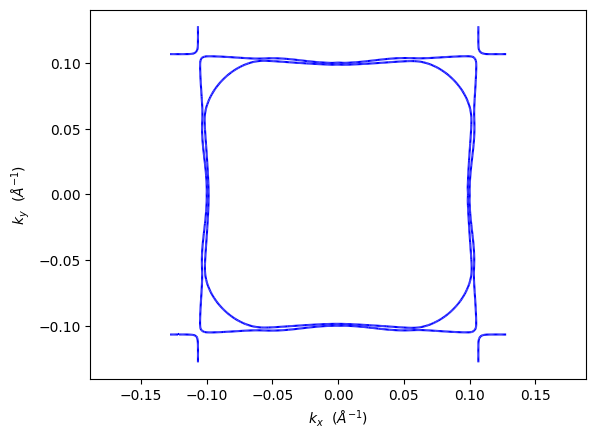
🧲 Non-collinear Fermi surface: Single channel with mixed spin states
3.2 Spin Projections - Total Magnetization
In non-collinear systems, there are four spin projections available. These help understand the magnetic character of different regions on the Fermi surface.
Available spin projections:
Total magnetization:
spins=[0]- Overall magnetic density on Fermi surfaceSx magnetization:
spins=[1]- x-component of local magnetic momentsSy magnetization:
spins=[2]- y-component of local magnetic momentsSz magnetization:
spins=[3]- z-component of local magnetic moments
[7]:
# Plot Fermi surface with total magnetization projection
pyprocar.fermi2D(
    code='vasp',
    dirname=NON_COLLINEAR_DATA_DIR,
    mode='parametric',
    fermi=5.3017,
    spins=[0],  # Total magnetization
    energy=0.0,
)

print("🎯 Total magnetization: Shows overall magnetic character of Fermi surface")
If you want more detailed logs, set verbose to 2 or more
____________________________________________________________________________________________________
 ____        ____
|  _ \ _   _|  _ \ _ __ ___   ___ __ _ _ __
| |_) | | | | |_) | '__/ _ \ / __/ _` | '__|
|  __/| |_| |  __/| | | (_) | (_| (_| | |
|_|    \__, |_|   |_|  \___/ \___\__,_|_|
       |___/
A Python library for electronic structure pre/post-processing.

Version 6.4.6 created on Mar 6th, 2025

Please cite:
- Uthpala Herath, Pedram Tavadze, Xu He, Eric Bousquet, Sobhit Singh, Francisco Muñoz and Aldo Romero.,
  PyProcar: A Python library for electronic structure pre/post-processing.,
  Computer Physics Communications 251, 107080 (2020).

- L. Lang, P. Tavadze, A. Tellez, E. Bousquet, H. Xu, F. Muñoz, N. Vasquez, U. Herath, and A. H. Romero,
  Expanding PyProcar for new features, maintainability, and reliability.,
  Computer Physics Communications 297, 109063 (2024).

Developers:
- Francisco Muñoz
- Aldo Romero
- Sobhit Singh
- Uthpala Herath
- Pedram Tavadze
- Eric Bousquet
- Xu He
- Reese Boucher
- Logan Lang
- Freddy Farah

____________________________________________________________________________________________________
### Parameters ###
dirname         : C:\Users\lllang\Desktop\notebooks\Notebook\01 - Projects\Pyprocar\pyprocar\examples\02-fermi2d\data\examples\fermi2d\non-colinear
bands           : None
atoms           : None
orbitals        : None
spin comp.      : [0]
energy          : 0.0
rot. symmetry   : 1
origin (trasl.) : [0, 0, 0]
rotation        : [0, 0, 0, 1]
save figure     : None
spin_texture    : False
____________________________________________________________________________________________________

            There are additional plot options that are defined in a configuration file.
            You can change these configurations by passing the keyword argument to the function
            To print a list of plot options set print_plot_opts=True

            Here is a list modes : plain , plain_bands , parametric
____________________________________________________________________________________________________
Initial kpoints shape: (10981, 3)
Initial bands shape: (10981, 50, 1)
Initial projected shape: (10981, 50, 5, 1, 9, 4)
WARNING: Make sure the kmesh has the correct number of kz pointswith kz=0.0 +- 0.01.
Kpoints in the kz=0.0 plane: (4205, 3)
Bands in the kz=0.0 plane: (4205, 50, 1)
Projected in the kz=0.0 plane: (4205, 50, 5, 1, 9, 4)
Spins for projections: [0]
Atoms for projections: [0 1 2 3 4]
Orbitals for projections: [0 1 2 3 4 5 6 7 8]
Band indices near iso-surface: (bands.shape=(4205, 50)) spin-0 | bands-[32 33 34]
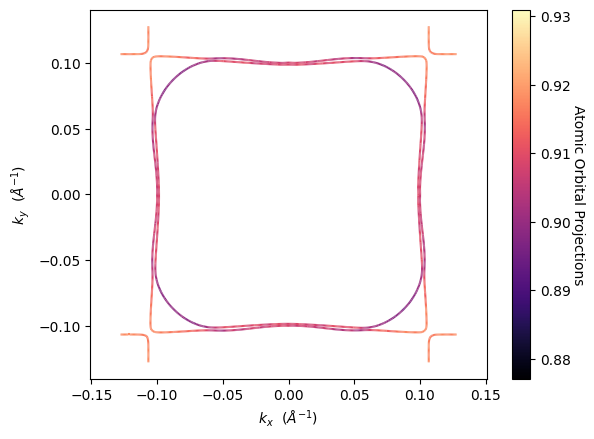
🎯 Total magnetization: Shows overall magnetic character of Fermi surface
3.3 Spin Component Projections
We can also visualize the individual spin components (sx, sy, sz) to understand which regions of the Fermi surface contribute to different spatial orientations of the magnetic moments:
[8]:
# Plot Fermi surface with sx component (x-direction spin)
pyprocar.fermi2D(
    code='vasp',
    dirname=NON_COLLINEAR_DATA_DIR,
    mode='parametric',
    fermi=5.3017,
    spins=[1],  # Sx component
    energy=0.0,
)

print("↔️ Sx component: Magnetic moments oriented along x-direction")
If you want more detailed logs, set verbose to 2 or more
____________________________________________________________________________________________________
 ____        ____
|  _ \ _   _|  _ \ _ __ ___   ___ __ _ _ __
| |_) | | | | |_) | '__/ _ \ / __/ _` | '__|
|  __/| |_| |  __/| | | (_) | (_| (_| | |
|_|    \__, |_|   |_|  \___/ \___\__,_|_|
       |___/
A Python library for electronic structure pre/post-processing.

Version 6.4.6 created on Mar 6th, 2025

Please cite:
- Uthpala Herath, Pedram Tavadze, Xu He, Eric Bousquet, Sobhit Singh, Francisco Muñoz and Aldo Romero.,
  PyProcar: A Python library for electronic structure pre/post-processing.,
  Computer Physics Communications 251, 107080 (2020).

- L. Lang, P. Tavadze, A. Tellez, E. Bousquet, H. Xu, F. Muñoz, N. Vasquez, U. Herath, and A. H. Romero,
  Expanding PyProcar for new features, maintainability, and reliability.,
  Computer Physics Communications 297, 109063 (2024).

Developers:
- Francisco Muñoz
- Aldo Romero
- Sobhit Singh
- Uthpala Herath
- Pedram Tavadze
- Eric Bousquet
- Xu He
- Reese Boucher
- Logan Lang
- Freddy Farah

____________________________________________________________________________________________________
### Parameters ###
dirname         : C:\Users\lllang\Desktop\notebooks\Notebook\01 - Projects\Pyprocar\pyprocar\examples\02-fermi2d\data\examples\fermi2d\non-colinear
bands           : None
atoms           : None
orbitals        : None
spin comp.      : [1]
energy          : 0.0
rot. symmetry   : 1
origin (trasl.) : [0, 0, 0]
rotation        : [0, 0, 0, 1]
save figure     : None
spin_texture    : False
____________________________________________________________________________________________________

            There are additional plot options that are defined in a configuration file.
            You can change these configurations by passing the keyword argument to the function
            To print a list of plot options set print_plot_opts=True

            Here is a list modes : plain , plain_bands , parametric
____________________________________________________________________________________________________
Initial kpoints shape: (10981, 3)
Initial bands shape: (10981, 50, 1)
Initial projected shape: (10981, 50, 5, 1, 9, 4)
WARNING: Make sure the kmesh has the correct number of kz pointswith kz=0.0 +- 0.01.
Kpoints in the kz=0.0 plane: (4205, 3)
Bands in the kz=0.0 plane: (4205, 50, 1)
Projected in the kz=0.0 plane: (4205, 50, 5, 1, 9, 4)
Spins for projections: [1]
Atoms for projections: [0 1 2 3 4]
Orbitals for projections: [0 1 2 3 4 5 6 7 8]
Band indices near iso-surface: (bands.shape=(4205, 50)) spin-0 | bands-[32 33 34]
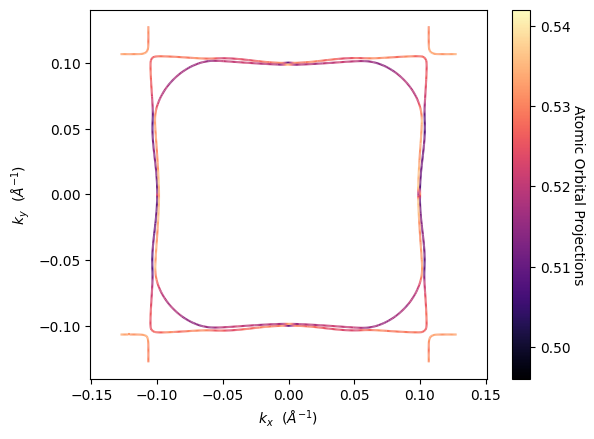
↔️ Sx component: Magnetic moments oriented along x-direction
[9]:
# Plot Fermi surface with sy component (y-direction spin)
pyprocar.fermi2D(
    code='vasp',
    dirname=NON_COLLINEAR_DATA_DIR,
    mode='parametric',
    fermi=5.3017,
    spins=[2],  # Sy component
    energy=0.0,
)

print("↕️ Sy component: Magnetic moments oriented along y-direction")
If you want more detailed logs, set verbose to 2 or more
____________________________________________________________________________________________________
 ____        ____
|  _ \ _   _|  _ \ _ __ ___   ___ __ _ _ __
| |_) | | | | |_) | '__/ _ \ / __/ _` | '__|
|  __/| |_| |  __/| | | (_) | (_| (_| | |
|_|    \__, |_|   |_|  \___/ \___\__,_|_|
       |___/
A Python library for electronic structure pre/post-processing.

Version 6.4.6 created on Mar 6th, 2025

Please cite:
- Uthpala Herath, Pedram Tavadze, Xu He, Eric Bousquet, Sobhit Singh, Francisco Muñoz and Aldo Romero.,
  PyProcar: A Python library for electronic structure pre/post-processing.,
  Computer Physics Communications 251, 107080 (2020).

- L. Lang, P. Tavadze, A. Tellez, E. Bousquet, H. Xu, F. Muñoz, N. Vasquez, U. Herath, and A. H. Romero,
  Expanding PyProcar for new features, maintainability, and reliability.,
  Computer Physics Communications 297, 109063 (2024).

Developers:
- Francisco Muñoz
- Aldo Romero
- Sobhit Singh
- Uthpala Herath
- Pedram Tavadze
- Eric Bousquet
- Xu He
- Reese Boucher
- Logan Lang
- Freddy Farah

____________________________________________________________________________________________________
### Parameters ###
dirname         : C:\Users\lllang\Desktop\notebooks\Notebook\01 - Projects\Pyprocar\pyprocar\examples\02-fermi2d\data\examples\fermi2d\non-colinear
bands           : None
atoms           : None
orbitals        : None
spin comp.      : [2]
energy          : 0.0
rot. symmetry   : 1
origin (trasl.) : [0, 0, 0]
rotation        : [0, 0, 0, 1]
save figure     : None
spin_texture    : False
____________________________________________________________________________________________________

            There are additional plot options that are defined in a configuration file.
            You can change these configurations by passing the keyword argument to the function
            To print a list of plot options set print_plot_opts=True

            Here is a list modes : plain , plain_bands , parametric
____________________________________________________________________________________________________
Initial kpoints shape: (10981, 3)
Initial bands shape: (10981, 50, 1)
Initial projected shape: (10981, 50, 5, 1, 9, 4)
WARNING: Make sure the kmesh has the correct number of kz pointswith kz=0.0 +- 0.01.
Kpoints in the kz=0.0 plane: (4205, 3)
Bands in the kz=0.0 plane: (4205, 50, 1)
Projected in the kz=0.0 plane: (4205, 50, 5, 1, 9, 4)
Spins for projections: [2]
Atoms for projections: [0 1 2 3 4]
Orbitals for projections: [0 1 2 3 4 5 6 7 8]
Band indices near iso-surface: (bands.shape=(4205, 50)) spin-0 | bands-[32 33 34]
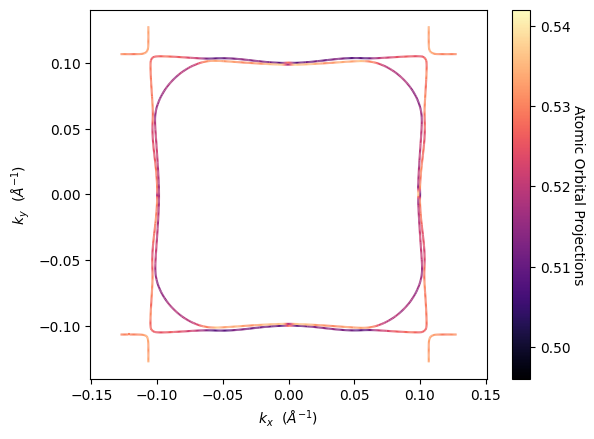
↕️ Sy component: Magnetic moments oriented along y-direction
[10]:
# Plot Fermi surface with sz component (z-direction spin)
pyprocar.fermi2D(
    code='vasp',
    dirname=NON_COLLINEAR_DATA_DIR,
    mode='parametric',
    fermi=5.3017,
    spins=[3],  # Sz component
    energy=0.0,
)

print("🔼 Sz component: Magnetic moments oriented along z-direction")
If you want more detailed logs, set verbose to 2 or more
____________________________________________________________________________________________________
 ____        ____
|  _ \ _   _|  _ \ _ __ ___   ___ __ _ _ __
| |_) | | | | |_) | '__/ _ \ / __/ _` | '__|
|  __/| |_| |  __/| | | (_) | (_| (_| | |
|_|    \__, |_|   |_|  \___/ \___\__,_|_|
       |___/
A Python library for electronic structure pre/post-processing.

Version 6.4.6 created on Mar 6th, 2025

Please cite:
- Uthpala Herath, Pedram Tavadze, Xu He, Eric Bousquet, Sobhit Singh, Francisco Muñoz and Aldo Romero.,
  PyProcar: A Python library for electronic structure pre/post-processing.,
  Computer Physics Communications 251, 107080 (2020).

- L. Lang, P. Tavadze, A. Tellez, E. Bousquet, H. Xu, F. Muñoz, N. Vasquez, U. Herath, and A. H. Romero,
  Expanding PyProcar for new features, maintainability, and reliability.,
  Computer Physics Communications 297, 109063 (2024).

Developers:
- Francisco Muñoz
- Aldo Romero
- Sobhit Singh
- Uthpala Herath
- Pedram Tavadze
- Eric Bousquet
- Xu He
- Reese Boucher
- Logan Lang
- Freddy Farah

____________________________________________________________________________________________________
### Parameters ###
dirname         : C:\Users\lllang\Desktop\notebooks\Notebook\01 - Projects\Pyprocar\pyprocar\examples\02-fermi2d\data\examples\fermi2d\non-colinear
bands           : None
atoms           : None
orbitals        : None
spin comp.      : [3]
energy          : 0.0
rot. symmetry   : 1
origin (trasl.) : [0, 0, 0]
rotation        : [0, 0, 0, 1]
save figure     : None
spin_texture    : False
____________________________________________________________________________________________________

            There are additional plot options that are defined in a configuration file.
            You can change these configurations by passing the keyword argument to the function
            To print a list of plot options set print_plot_opts=True

            Here is a list modes : plain , plain_bands , parametric
____________________________________________________________________________________________________
Initial kpoints shape: (10981, 3)
Initial bands shape: (10981, 50, 1)
Initial projected shape: (10981, 50, 5, 1, 9, 4)
WARNING: Make sure the kmesh has the correct number of kz pointswith kz=0.0 +- 0.01.
Kpoints in the kz=0.0 plane: (4205, 3)
Bands in the kz=0.0 plane: (4205, 50, 1)
Projected in the kz=0.0 plane: (4205, 50, 5, 1, 9, 4)
Spins for projections: [3]
Atoms for projections: [0 1 2 3 4]
Orbitals for projections: [0 1 2 3 4 5 6 7 8]
Band indices near iso-surface: (bands.shape=(4205, 50)) spin-0 | bands-[32 33 34]
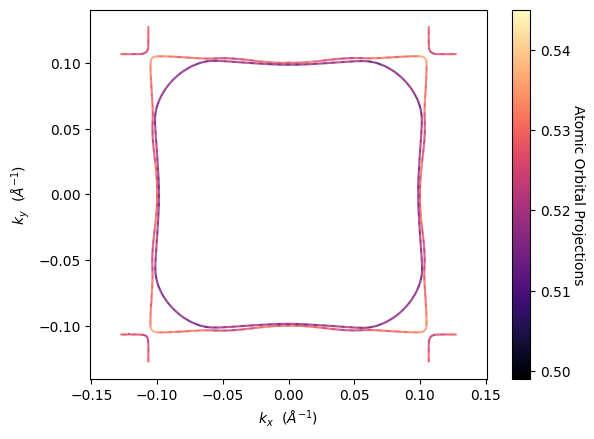
🔼 Sz component: Magnetic moments oriented along z-direction
3.4 Spin Texture Mode
The spin texture mode is unique to fermi2D and one of its most powerful features for non-collinear magnetic systems. It visualizes the orientation and magnitude of spin vectors directly on the Fermi surface, providing unprecedented insight into the magnetic texture of the electronic states.
Key features of spin texture mode:
Arrows/vectors show the direction of local magnetic moments
Arrow size represents the magnitude of the magnetic moment
Arrow color can represent different spin projections
Arrow density controls how many vectors are displayed
Perfect for understanding topological properties and magnetic domains
[14]:
# Plot Fermi surface with spin texture - basic version
pyprocar.fermi2D(
    code='vasp',
    dirname=NON_COLLINEAR_DATA_DIR,
    spin_texture=True,
    fermi=5.3017,
    energy=0.0,
    arrow_size=0.5,
    arrow_density=5,
    spin_projection='x',
    arrow_color='blue',
)

print("🌪️ Spin texture: Arrows show spin orientation on Fermi surface")
If you want more detailed logs, set verbose to 2 or more
____________________________________________________________________________________________________
 ____        ____
|  _ \ _   _|  _ \ _ __ ___   ___ __ _ _ __
| |_) | | | | |_) | '__/ _ \ / __/ _` | '__|
|  __/| |_| |  __/| | | (_) | (_| (_| | |
|_|    \__, |_|   |_|  \___/ \___\__,_|_|
       |___/
A Python library for electronic structure pre/post-processing.

Version 6.4.6 created on Mar 6th, 2025

Please cite:
- Uthpala Herath, Pedram Tavadze, Xu He, Eric Bousquet, Sobhit Singh, Francisco Muñoz and Aldo Romero.,
  PyProcar: A Python library for electronic structure pre/post-processing.,
  Computer Physics Communications 251, 107080 (2020).

- L. Lang, P. Tavadze, A. Tellez, E. Bousquet, H. Xu, F. Muñoz, N. Vasquez, U. Herath, and A. H. Romero,
  Expanding PyProcar for new features, maintainability, and reliability.,
  Computer Physics Communications 297, 109063 (2024).

Developers:
- Francisco Muñoz
- Aldo Romero
- Sobhit Singh
- Uthpala Herath
- Pedram Tavadze
- Eric Bousquet
- Xu He
- Reese Boucher
- Logan Lang
- Freddy Farah

____________________________________________________________________________________________________
### Parameters ###
dirname         : C:\Users\lllang\Desktop\notebooks\Notebook\01 - Projects\Pyprocar\pyprocar\examples\02-fermi2d\data\examples\fermi2d\non-colinear
bands           : None
atoms           : None
orbitals        : None
spin comp.      : None
energy          : 0.0
rot. symmetry   : 1
origin (trasl.) : [0, 0, 0]
rotation        : [0, 0, 0, 1]
save figure     : None
spin_texture    : True
____________________________________________________________________________________________________

            There are additional plot options that are defined in a configuration file.
            You can change these configurations by passing the keyword argument to the function
            To print a list of plot options set print_plot_opts=True

            Here is a list modes : plain , plain_bands , parametric
____________________________________________________________________________________________________
Initial kpoints shape: (10981, 3)
Initial bands shape: (10981, 50, 1)
Initial projected shape: (10981, 50, 5, 1, 9, 4)
WARNING: Make sure the kmesh has the correct number of kz pointswith kz=0.0 +- 0.01.
Kpoints in the kz=0.0 plane: (4205, 3)
Bands in the kz=0.0 plane: (4205, 50, 1)
Projected in the kz=0.0 plane: (4205, 50, 5, 1, 9, 4)
Band indices near iso-surface: (bands.shape=(4205, 50)) spin-0 | bands-[32 33 34]
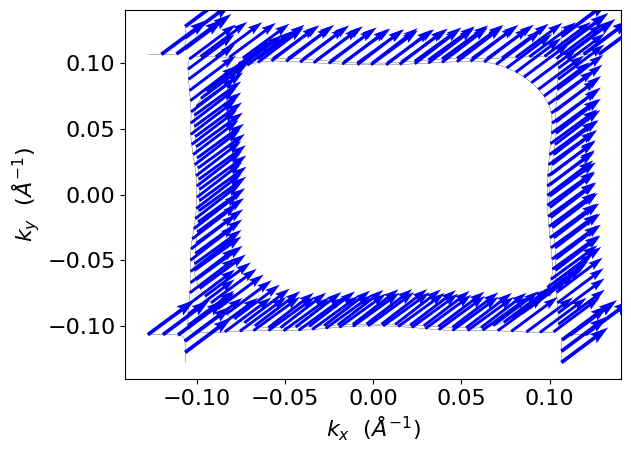
🌪️ Spin texture: Arrows show spin orientation on Fermi surface
Available Spin Projections
The spin_projection parameter in spin texture mode controls how the spin information is mapped to the arrow colors. Here are all available options:
Spin Projection |
Description |
Use Case |
|---|---|---|
|
X-component of spin vector (Sx) |
Visualize spin orientation along x-axis |
|
Y-component of spin vector (Sy) |
Visualize spin orientation along y-axis |
|
Z-component of spin vector (Sz) |
Visualize spin orientation along z-axis |
|
Square of X-component (Sx²) |
Emphasize x-component magnitude |
|
Square of Y-component (Sy²) |
Emphasize y-component magnitude |
|
Square of Z-component (Sz²) |
Emphasize z-component magnitude (default) |
Notes:
The squared projections (
x^2,y^2,z^2) always give positive values and emphasize regions with strong spin characterThe linear projections (
x,y,z) can be positive or negative, showing both magnitude and direction"z^2"is the default and often most useful for out-of-plane magnetic systemsFor in-plane magnetic systems,
"x"or"y"may be more appropriate
3.5 Advanced Spin Texture Customization
The spin texture mode offers several parameters to customize the visualization:
Key Parameters:
arrow_size: Controls the size/length of spin arrows (default: 3)arrow_density: Controls how many arrows are displayed (default: 10)arrow_color: Fixed color for all arrows (overrides spin_projection coloring)no_arrow: Use scatter points instead of arrows (default: False)marker: Marker style when usingno_arrow=True(default: ‘.’)cmap: Colormap for spin projection coloring (default: ‘jet’)plot_color_bar: Show color bar legend (default: False)
[19]:
# Scatter plot style (no arrows)
pyprocar.fermi2D(
    code='vasp',
    dirname=NON_COLLINEAR_DATA_DIR,
    spin_texture=True,
    fermi=5.3017,
    energy=0.0,
    no_arrow=True,  # Use scatter points instead of arrows
    marker='o',  # Circle marker
    spin_projection='z^2',
    plot_color_bar=True,
    cmap='viridis',
)

print("⚫ Scatter plot style showing z² spin projection")
If you want more detailed logs, set verbose to 2 or more
____________________________________________________________________________________________________
 ____        ____
|  _ \ _   _|  _ \ _ __ ___   ___ __ _ _ __
| |_) | | | | |_) | '__/ _ \ / __/ _` | '__|
|  __/| |_| |  __/| | | (_) | (_| (_| | |
|_|    \__, |_|   |_|  \___/ \___\__,_|_|
       |___/
A Python library for electronic structure pre/post-processing.

Version 6.4.6 created on Mar 6th, 2025

Please cite:
- Uthpala Herath, Pedram Tavadze, Xu He, Eric Bousquet, Sobhit Singh, Francisco Muñoz and Aldo Romero.,
  PyProcar: A Python library for electronic structure pre/post-processing.,
  Computer Physics Communications 251, 107080 (2020).

- L. Lang, P. Tavadze, A. Tellez, E. Bousquet, H. Xu, F. Muñoz, N. Vasquez, U. Herath, and A. H. Romero,
  Expanding PyProcar for new features, maintainability, and reliability.,
  Computer Physics Communications 297, 109063 (2024).

Developers:
- Francisco Muñoz
- Aldo Romero
- Sobhit Singh
- Uthpala Herath
- Pedram Tavadze
- Eric Bousquet
- Xu He
- Reese Boucher
- Logan Lang
- Freddy Farah

____________________________________________________________________________________________________
### Parameters ###
dirname         : C:\Users\lllang\Desktop\notebooks\Notebook\01 - Projects\Pyprocar\pyprocar\examples\02-fermi2d\data\examples\fermi2d\non-colinear
bands           : None
atoms           : None
orbitals        : None
spin comp.      : None
energy          : 0.0
rot. symmetry   : 1
origin (trasl.) : [0, 0, 0]
rotation        : [0, 0, 0, 1]
save figure     : None
spin_texture    : True
____________________________________________________________________________________________________

            There are additional plot options that are defined in a configuration file.
            You can change these configurations by passing the keyword argument to the function
            To print a list of plot options set print_plot_opts=True

            Here is a list modes : plain , plain_bands , parametric
____________________________________________________________________________________________________
Initial kpoints shape: (10981, 3)
Initial bands shape: (10981, 50, 1)
Initial projected shape: (10981, 50, 5, 1, 9, 4)
WARNING: Make sure the kmesh has the correct number of kz pointswith kz=0.0 +- 0.01.
Kpoints in the kz=0.0 plane: (4205, 3)
Bands in the kz=0.0 plane: (4205, 50, 1)
Projected in the kz=0.0 plane: (4205, 50, 5, 1, 9, 4)
Band indices near iso-surface: (bands.shape=(4205, 50)) spin-0 | bands-[32 33 34]

⚫ Scatter plot style showing z² spin projection
4. Additional fermi2D Modes for Spin Analysis
Beyond the basic modes we’ve covered, fermi2D offers additional specialized modes for detailed spin-dependent analysis:
4.1 Plain Bands Mode
The plain_bands mode shows individual band contributions to the Fermi surface, which is particularly useful for understanding which specific bands contribute to each spin channel.
[20]:
# Plot individual bands for spin-polarized system
pyprocar.fermi2D(
    code='vasp',
    dirname=SPIN_POL_DATA_DIR,
    mode='plain_bands',
    fermi=5.3017,
    energy=0.0,
    band_indices=[[16], []],  # Same bands for both spins
    band_colors=[['blue', 'cyan', 'navy'], ['red', 'pink', 'darkred']],  # Different colors per spin
)
If you want more detailed logs, set verbose to 2 or more
____________________________________________________________________________________________________
 ____        ____
|  _ \ _   _|  _ \ _ __ ___   ___ __ _ _ __
| |_) | | | | |_) | '__/ _ \ / __/ _` | '__|
|  __/| |_| |  __/| | | (_) | (_| (_| | |
|_|    \__, |_|   |_|  \___/ \___\__,_|_|
       |___/
A Python library for electronic structure pre/post-processing.

Version 6.4.6 created on Mar 6th, 2025

Please cite:
- Uthpala Herath, Pedram Tavadze, Xu He, Eric Bousquet, Sobhit Singh, Francisco Muñoz and Aldo Romero.,
  PyProcar: A Python library for electronic structure pre/post-processing.,
  Computer Physics Communications 251, 107080 (2020).

- L. Lang, P. Tavadze, A. Tellez, E. Bousquet, H. Xu, F. Muñoz, N. Vasquez, U. Herath, and A. H. Romero,
  Expanding PyProcar for new features, maintainability, and reliability.,
  Computer Physics Communications 297, 109063 (2024).

Developers:
- Francisco Muñoz
- Aldo Romero
- Sobhit Singh
- Uthpala Herath
- Pedram Tavadze
- Eric Bousquet
- Xu He
- Reese Boucher
- Logan Lang
- Freddy Farah

____________________________________________________________________________________________________
### Parameters ###
dirname         : C:\Users\lllang\Desktop\notebooks\Notebook\01 - Projects\Pyprocar\pyprocar\examples\02-fermi2d\data\examples\fermi2d\spin-polarized
bands           : [[16], []]
atoms           : None
orbitals        : None
spin comp.      : None
energy          : 0.0
rot. symmetry   : 1
origin (trasl.) : [0, 0, 0]
rotation        : [0, 0, 0, 1]
save figure     : None
spin_texture    : False
____________________________________________________________________________________________________

            There are additional plot options that are defined in a configuration file.
            You can change these configurations by passing the keyword argument to the function
            To print a list of plot options set print_plot_opts=True

            Here is a list modes : plain , plain_bands , parametric
____________________________________________________________________________________________________
Initial kpoints shape: (10981, 3)
Initial bands shape: (10981, 30, 2)
Initial projected shape: (10981, 30, 5, 1, 9, 2)
WARNING: Make sure the kmesh has the correct number of kz pointswith kz=0.0 +- 0.01.
Kpoints in the kz=0.0 plane: (4205, 3)
Bands in the kz=0.0 plane: (4205, 30, 2)
Projected in the kz=0.0 plane: (4205, 30, 5, 1, 9, 2)
Spins for projections: [0 1]
Atoms for projections: [0 1 2 3 4]
Orbitals for projections: [0 1 2 3 4 5 6 7 8]
Band indices near iso-surface: (bands.shape=(4205, 30)) spin-0 | bands-[16 17 18]

5. Summary and Best Practices
This tutorial has covered the comprehensive functionality of PyProcar’s fermi2D function for analyzing spin-polarized and non-collinear magnetic systems:
Key Takeaways:
For Spin-Polarized Systems:
Use
mode='plain'for basic Fermi surface topology comparison between spinsUse
mode='parametric'to understand orbital contributions to each spin channelUse
spins=[0]orspins=[1]to focus on individual spin channelsCustomize appearance with
color,linewidth, andlinestyleparameters
For Non-Collinear Systems:
Use
mode='plain'for overall Fermi surface structureUse
mode='parametric'withspins=[0,1,2,3]to analyze different spin projectionsUse ``mode=’spin_texture’`` for the most detailed magnetic analysis
Choose appropriate
spin_projectionvalues based on your magnetic system:'z^2'(default): Good for out-of-plane magnetism'x','y','z': Shows directional components with sign'x^2','y^2': Emphasizes in-plane magnetic character
Best Practices:
Start with ``plain`` mode to understand overall Fermi surface topology
Use ``parametric`` mode to identify important orbitals/atoms
Use ``spin_texture`` mode for detailed magnetic analysis in non-collinear systems
Adjust ``arrow_density`` and ``arrow_size`` for optimal visualization
Use ``plot_color_bar=True`` to understand the color scale
Compare different ``spin_projection`` values to get complete picture
fermi2D vs Other Methods:
fermi2D provides unique 2D cross-sections of the Fermi surface
Spin texture mode is exclusive to fermi2D and invaluable for magnetic systems
Perfect complement to 3D Fermi surface analysis for detailed k-space studies